 SLAPJAM
How do I connect Claude Code or Codex to Godot? What 25 Godot jam games did
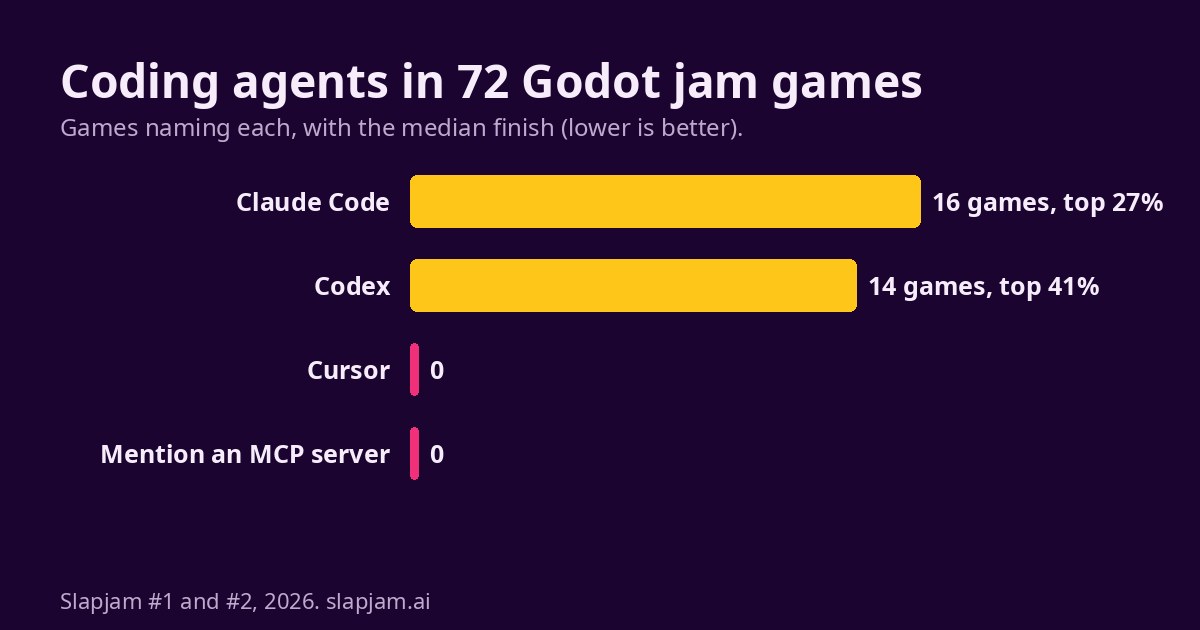
You don't need to connect anything to start using Claude Code or Codex with Godot. A Godot project is a folder of text files: GDScript scripts, .tscn scenes and project.godot. Open a terminal in that folder, run claude or codex, and ask for a change. The agent edits the files, and the Godot editor notices and offers to reload them. Of the 72 Godot games in Slapjam #1 and #2, 25 name Claude Code or Codex, and none mentions an MCP server or any other bridge to Godot. Those 25 finished at a median of the top 35% of their jam, and 4 of the 5 Godot games that reached the top ten name one of the two.
What a connection adds is sight. A Godot MCP server lets the agent run your game, send input, take screenshots and read Godot's errors itself, instead of waiting for you to describe them.
How we counted
We read the tools checklist and the itch.io page of all 359 entries to Slapjam #1 and #2 on November 28, 2026, taking the engine from "Made with". A game counts for a tool if either names it. One language-model pass also recorded how each developer worked and whether the page mentions MCP, an editor bridge or automated tests. Median placing is the middle finish as a share of the field, so lower is better; the whole field finished at 49%. The full method is in our count of the AI tools 359 jam games used.
| Coding agent | Godot games | Median placing | Top-ten finishes | All engines |
|---|---|---|---|---|
| Claude Code | 16 | 27% | 3 | 60 games, 34% |
| Codex | 14 | 41% | 2 | 55 games, 48% |
| Either | 25 | 35% | 4 | |
| Cursor | 0 | 2 games |
13 of the 16 Godot games that name Claude Code finished in the top half, including Keep It Crispy, which named Claude Code and Codex and won Slapjam #1. Only two Slapjam pages mention MCP at all, and both are Unity games that used a Unity MCP server to drive the Unity editor.
Step 1: run the agent in your project folder
- Commit your project to git, or copy the folder, so you can undo what the agent does.
- Open a terminal in the folder that holds
project.godotand runclaude(Claude Code) orcodex(Codex). - Ask for one small change, such as "add a jump to the player script". Then run the game in Godot and tell the agent what happened.
Siege Labyrinth (36th of 141) went further: its page says Claude Code wrote all the game code plus "the test bots, the build and upload scripts". An agent can call Godot's command line to run scripts headless or export the game. 11 Slapjam pages mention AI-written tests or automated play checks.
Cursor works the same way: open the project folder in Cursor and use its agent there.
Step 2: add a Godot MCP server so the agent can see the game
Working only on files, the agent never sees your game running, the scene tree as the editor loads it or Godot's error output. An MCP server gives it tools for that. Options include:
- godot-mcp, an open-source MCP server that launches the editor, runs projects and captures debug output.
- Godot AI, an MCP server and set of AI tools for Godot.
- Ziva, a Godot editor plugin that also runs a local MCP server,
ziva-godot. Its tools run your game, send input, take screenshots, read Godot's errors, inspect scenes and edit nodes and scripts. Ziva's dock has a one-click install for Claude Code (it runsclaude mcp add), Codex (it adds the server to~/.codex/config.toml) and Cursor, and the MCP server works on every Ziva plan, including the free Hobby plan (MCP server docs). Two of the 25 Godot games name Ziva alongside Claude Code or Codex.
Disclosure: Ziva is a Gold sponsor of Slapjam #3.
Which account does it use?
Claude Code runs on your Claude subscription or an Anthropic API key, and Codex on your ChatGPT plan or an OpenAI API key. An MCP server only adds Godot tools, so the agent's usage still comes from that account.
If you would rather work inside the Godot editor, Ziva can also use the subscription directly: in Settings > Models & Providers > Use Existing Subscriptions, connect Claude Code (your Anthropic account) or Codex (your ChatGPT account). This works on every Ziva plan, including Hobby, and requests count toward your provider's usage instead of Ziva's (existing subscriptions docs).
What the numbers can't tell you
- Everything is self-reported. A page that doesn't mention MCP may still have used one, so "none mention it" is a floor, not proof nobody did.
- The Godot groups are small, and Claude Code and Codex overlap: some games name both.
- Each game got a handful of ratings, so a few places either way is noise.
For what Godot developers used AI for beyond code, see how 72 Godot jam games used AI. Slapjam #3 starts November 28 at 15:00 UTC and runs for 48 hours; any AI tool is allowed.