 SLAPJAM
News / Sponsor spotlight
Godot web multiplayer: WebSocket, WebRTC and itch.io
Yes, a Godot web (HTML5) export can do online multiplayer with WebSocket or WebRTC, but browsers cannot use ENet/UDP or listen as WebSocket servers. Use WebSocketMultiplayerPeer with a server or relay reachable over wss:// from an HTTPS page, or WebRTCMultiplayerPeer with a signaling service and STUN/TURN for internet connectivity.
By Daniel Ginovker. Sponsored by Ziva.
The author is a cofounder of Ziva.
Start with a working WebSocket export
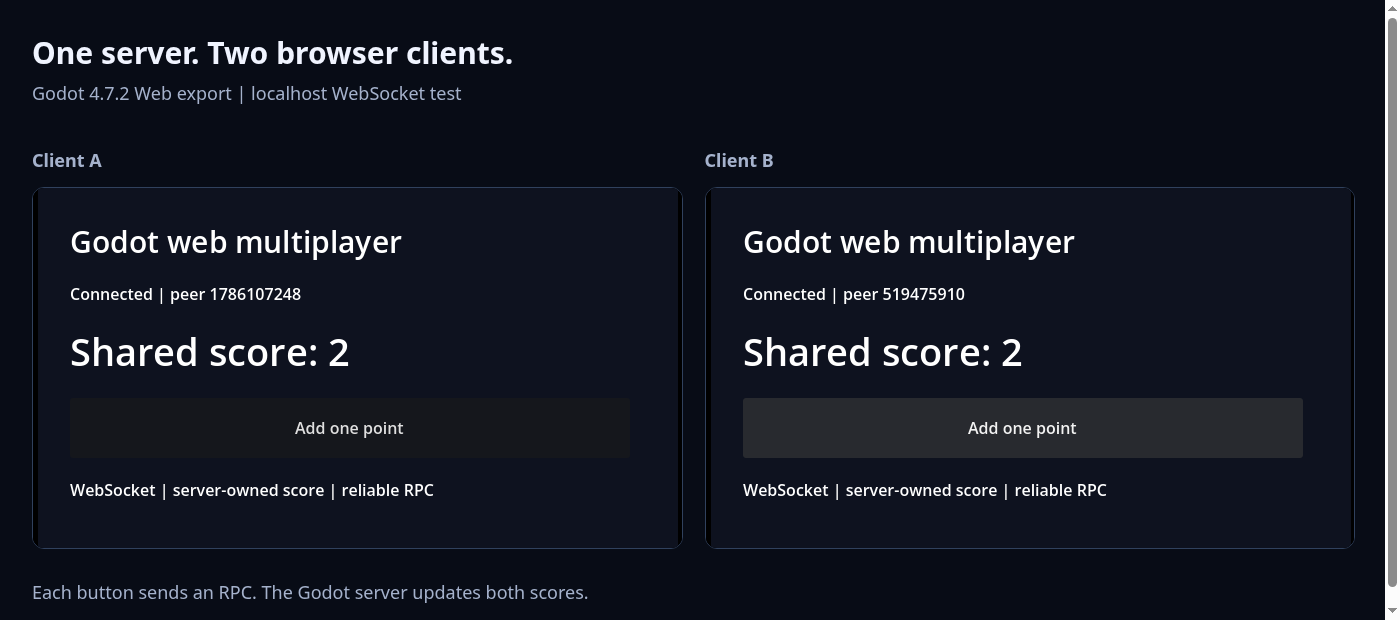
For a small jam game, get two browser clients exchanging one value before adding movement, lobbies or matchmaking. This test used Godot 4.7.2, a headless Godot server on localhost, and two exported game instances in headless Chrome. Each client sent an @rpc request to add a point. The server owned the score and sent the result to both clients.
1. Open the tested project
Download the source ZIP and extract it into a folder named project:
https://slapjam.ai/assets/news/godot-web-multiplayer-websocket-webrtc/godot-web-multiplayer.zip
It contains one Control scene, main.gd, project.godot and a Web export preset. Install Godot 4.7.2's export templates. The project uses the Compatibility renderer, with Thread Support, Extensions Support and PWA disabled in the Web preset.
The same scene runs on the server and clients, so the RPC node path is /root/Main everywhere. Godot requires matching node paths and RPC declarations. See https://docs.godotengine.org/en/stable/tutorials/networking/high_level_multiplayer.html.
2. Export and start the server
From the extracted project directory, these are the Linux commands used for the test:
mkdir -p ../web
/usr/bin/godot --headless --editor --path . --import
/usr/bin/godot --headless --path . --export-debug Web ../web/index.html
Then leave this running in one terminal:
/usr/bin/godot --headless --path . -- --server
The script checks the argument after --, creates a WebSocketMultiplayerPeer server bound to 127.0.0.1:19247, and prints SERVER_READY port=19247. Without --server, it creates a client for ws://127.0.0.1:19247 and assigns it to multiplayer.multiplayer_peer. It waits for connected_to_server before enabling the button. Connection failures appear on screen and in the log.
3. Serve the export and connect twice
In another terminal, still in project:
python3 -m http.server 18747 --bind 127.0.0.1 --directory ../web
Open http://127.0.0.1:18747/ in two tabs. Do not open the HTML file directly from disk. Wait for both clients to show Connected, then click Add one point once in each tab. Both should show Shared score: 2.
The automated test loaded those two game instances in separate iframes so they fit in one screenshot. The server log recorded two different senders, one with total=1 and the other with total=2. Each browser client logged CLIENT_STATE for totals 0, 1 and 2. That verifies an actual server round trip, not two counters changing independently.
4. Keep the server in charge of shared state
This is the score-changing part of the tested main.gd. The button calls add_point.rpc_id(1), because the dedicated Godot server has peer ID 1.
@rpc("any_peer", "call_remote", "reliable")
func add_point() -> void:
    if not multiplayer.is_server():
        fail("Only the server accepts points")
        return
    total += 1
    print("SERVER_RPC sender=%d total=%d" % [multiplayer.get_remote_sender_id(), total])
    set_total.rpc(total)

@rpc("authority", "call_remote", "reliable")
func set_total(value: int) -> void:
    total = value
    score.text = "Shared score: %d" % total
    print("CLIENT_STATE peer=%d total=%d" % [multiplayer.get_unique_id(), total])
The client asks for an action; it does not choose the new score. Only the authority can send set_total. The full script also requests the current score when a client joins. This is a networking test, not a secure competitive game: it has no authentication, rate limit or gameplay validation beyond the server-only check.
What changes on itch.io?
The browser is a WebSocket client, not a listening server. A Host button in a web game can mean “create a room” or “become the gameplay authority.” It cannot make the browser accept incoming TCP/WebSocket connections. ENet needs UDP access that a normal web export does not have. Godot's supported browser networking is documented here: https://docs.godotengine.org/en/stable/tutorials/export/exporting_for_web.html#networking.
Your server must exist outside the itch.io ZIP. itch.io serves the exported files; uploading index.html, the .wasm and the .pck does not start a Godot server. Package all export files together, with index.html at the ZIP's entry point. The official upload guide is https://itch.io/docs/creators/html5.
Replace localhost with a public wss:// endpoint. 127.0.0.1 means each player's own computer. itch.io uses HTTPS, so an insecure public ws:// connection is not a valid deployment plan. Use a TLS certificate trusted by browsers. If you terminate TLS at a reverse proxy, it must forward WebSocket upgrades to the Godot server. The demo's loopback binding can stay behind a proxy on the same machine. See https://docs.godotengine.org/en/stable/classes/class_websocketmultiplayerpeer.html and https://developer.mozilla.org/en-US/docs/Web/API/WebSockets_API/Writing_WebSocket_client_applications.
Multiplayer does not require threads. This demo synchronized both clients with crossOriginIsolated false and SharedArrayBuffer unavailable. If you enable threads for other parts of the game, Godot's Web export has additional secure-context and cross-origin-isolation requirements. Treat those as an export/hosting issue, not a requirement to use WebSocket: https://docs.godotengine.org/en/stable/tutorials/export/exporting_for_web.html#thread-and-extension-support.
Before submitting, test the actual itch.io embed with a friend on another network. A localhost pass does not test public DNS, certificates, proxy settings or internet latency.
What do I need for WebRTC instead?
WebRTC lets browser peers exchange game data without making either browser a listening WebSocket server. In Godot, the high-level peer is WebRTCMultiplayerPeer, with WebRTCPeerConnection handling each connection.
You still need to arrange the connection:
- Signaling: exchange session descriptions and ICE candidates through a signaling service, often a small WebSocket server. A room code alone is not a signaling implementation.
- STUN: usually needed on the internet to discover public-facing addresses for peers behind NAT.
- TURN: provide relay capacity for players whose networks prevent a direct connection. STUN does not guarantee that every pair of players can connect.
- Game authority: decide which peer owns shared state and what happens when it leaves. WebRTC does not decide your game's rules.
Godot's guide includes signaling examples: https://docs.godotengine.org/en/stable/tutorials/networking/webrtc.html. MDN explains the separate roles of ICE, STUN and TURN: https://developer.mozilla.org/en-US/docs/Web/API/WebRTC_API/Protocols.
WebSocket uses TCP, which keeps delivery reliable and ordered but can delay later data behind retransmissions. For fast movement, compare that behavior with WebRTC rather than assuming a small local demo predicts your game's internet performance. Godot discusses the tradeoff at https://docs.godotengine.org/en/stable/tutorials/networking/websocket.html.
The test in this article covers WebSocket only. It does not verify a WebRTC, STUN or TURN deployment.
Choose who runs the networking
Run your own server if you want the dedicated-server model above. A VPS can run headless Godot behind a TLS-enabled WebSocket proxy. You own uptime, updates, capacity and validation of player requests. A generic WebSocket echo server is not a replacement for the Godot server: it does not implement your Godot multiplayer RPCs.
Use a hosted relay if you do not want to operate that server. Ziva is one option for a small Godot co-op or turn-based game. Its hosted relay uses WebSocket, not WebRTC. Relay access requires Pro or Ultra. The setup_multiplayer tool checks access and writes the account ID, game ID and relay URL into the project. Those are public connection identifiers, not secrets. Setup docs: https://ziva.sh/docs/multiplayer.
This changes the architecture. Ziva's relay forwards messages; it does not run the Godot server script above. One player's game becomes the session's authority. Do not just replace the demo's URL: its rpc_id(1) calls target a real game server, while peer 1 on Ziva's relay is not a running copy of your game.
Check these limits before choosing it:
- At most 32 simultaneous connections per room.
- Each room is pinned to one Cloudflare location, with no regional migration. Distant players still pay that network delay.
- The room ID is any string you choose, and clients using the same ID join the same room. Use a random code rather than a shared name like
lobby. A random code is not authentication. - Bandwidth counts against the developer's account. There is a warning at 50 GB; past 500 GB, new connections are refused until the next calendar month, UTC. Existing connections stay connected.
- A replacement host does not automatically recover world state that was never synchronized.
The product limits are documented at https://ziva.sh/docs/multiplayer-limitations. These relay details were checked against Ziva's current documentation and setup code, not measured against its production service in this test.
Use a hosted game backend if your needs extend beyond forwarding Godot RPCs. Nakama has an official Godot 4 client, including a bridge to Godot's high-level multiplayer API, and Heroic Cloud offers managed Nakama hosting. You still integrate its socket and match setup; it is not a URL swap for WebSocketMultiplayerPeer. See https://github.com/heroiclabs/nakama-godot and https://heroiclabs.com/heroic-cloud/.
For a jam, choose the smallest option that survives your actual two-player test. Keep the exported browser build in that test from the start.
Ziva is a Gold sponsor of Slapjam.